All Pythons are beautiful but not every one of them is as fast

Everybody will assume that a newer software version will be always faster or at least fast as the previous, but is this always the case? In this article we will perform various tests vs lists and dictionaries in different Python versions to get an understanding if a newer version might cause a performance degradation or if the performance increase will be good enough that makes sense to upgrade to a newer Python version despite the needed effort that might need to do this
What we will measure
lists and dictionaries are the most used structs in Python, This performance test simulates batches of operations in waves in counts of thousands and millions of list elements and dictionary keys, the outcome of each test will be the time needed to accomplish the batches of operations per wave.
The test script
The following script creates four waves of batches, on each batch will be a list, and a dictionary created and manipulated inside for loops. Each batch size will be an increment x10 to verify the linearizability of the time needed to perform the operations. The operations will be
- Add an element to a list
- Pop an element from a list
- Add a key/value pair to a dictionary
- Get a value from a dictionary
#!/usr/bin/env python3
import sys
import time
import random

if __name__ == '__main__':

    # Measuring the time needed to create a list of N elements.
    for num_iter in [10000,100000,1000000,10000000]:
        random_list = []
        random_dict = {}
        start_time = time.time()
        # Append to list
        for i in range(num_iter):
            random_list.append(random.randint(0, 100))
        consumed_time = time.time() - start_time
        print("append_list,%s,%s,%s"%(num_iter,consumed_time,sys.version.split(" ")[0]))
        start_time = time.time()
        # Pop from list
        for i in range(num_iter):
            random_list.pop()
        consumed_time = time.time() - start_time
        print("pop_list,%s,%s,%s"%(num_iter,consumed_time,sys.version.split(" ")[0]))
        start_time = time.time()
        # Add key to dictionary
        for i in range(num_iter):
            random_dict[i] = i
        consumed_time = time.time() - start_time
        print("add_key,%s,%s,%s"%(num_iter,consumed_time,sys.version.split(" ")[0]))
        start_time = time.time()
        # Get key from dictionary
        for i in range(num_iter):
            x = random_dict[i]
        consumed_time = time.time() - start_time
        print("get_key,%s,%s,%s"%(num_iter,consumed_time,sys.version.split(" ")[0]))
How data will be collected
We have created the following bash script, this script executes the previous Python script using Python versions from 3.3 to 3.12
#!/bin/bash
docker run -v "$(pwd):/app" -w /app python:3.3 python ./python_perf.py
docker run -v "$(pwd):/app" -w /app python:3.4 python ./python_perf.py
docker run -v "$(pwd):/app" -w /app python:3.5 python ./python_perf.py
docker run -v "$(pwd):/app" -w /app python:3.6 python ./python_perf.py
docker run -v "$(pwd):/app" -w /app python:3.7 python ./python_perf.py
docker run -v "$(pwd):/app" -w /app python:3.8 python ./python_perf.py
docker run -v "$(pwd):/app" -w /app python:3.9 python ./python_perf.py
docker run -v "$(pwd):/app" -w /app python:3.10 python ./python_perf.py
docker run -v "$(pwd):/app" -w /app python:3.11 python ./python_perf.py
docker run -v "$(pwd):/app" -w /app python:3.12 python ./python_perf.py
To save data in a csv file we create a text file with the following headers
operation,iterations,time,versionThen we run the script for a good amount of times to have a good sample, I runned the script 10 times
./test.sh >> snakes.csv
./test.sh >> snakes.csv
./test.sh >> snakes.csv
./test.sh >> snakes.csv
./test.sh >> snakes.csv
./test.sh >> snakes.csv
./test.sh >> snakes.csv
./test.sh >> snakes.csv
./test.sh >> snakes.csv
./test.sh >> snakes.csv
Analyze data
To analyze data we will use Pandas and Matplotlib to create some nice charts, this script will do for each operation and iteration a plot with the time needed for each Python version execute the test
import pandas as pd
import matplotlib.pyplot as plt
df = pd.read_csv('snakes.csv')
operations = df['operation'].unique()

iterations = df['iterations'].unique()

fig, axs = plt.subplots(len(operations), len(iterations), figsize=(15, 15))

for i, operation in enumerate(operations):
    for j, iteration in enumerate(iterations):
        filtered_df = df[(df['operation'] == operation) & (df['iterations'] == iteration)]

        # Group the filtered DataFrame by 'version' and calculate the mean time for each group
        grouped_data = filtered_df.groupby('version')['time'].mean()
        axs[i, j].plot(grouped_data, marker='o')
        axs[i, j].set_title(f'{operation} - Iterations: {iteration}')
        axs[i, j].set_xlabel('Version')
        axs[i, j].set_ylabel('Average Time')
        axs[i, j].grid(True)
        axs[i, j].tick_params(axis='x', rotation=90)

plt.tight_layout()
plt.show()
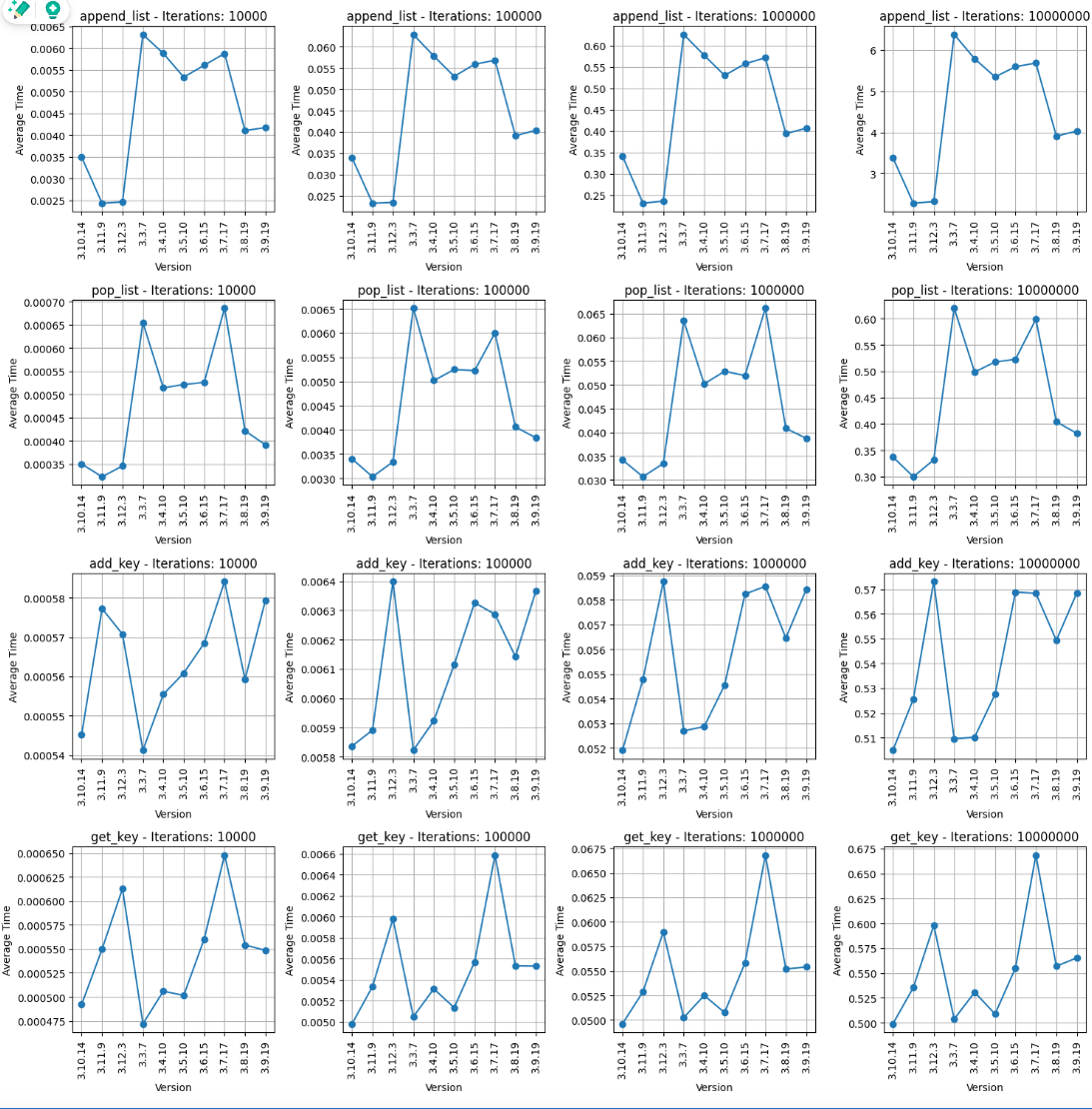
The script generated the following charts
Results
- We can see that the plots from left to right have the same pattern, examining values we can see that are 10 folds greater from each previous batch, this verify that the time needed to execute its batch is linear
- Append list operation: Python versions 3.11 and 3.12 are far faster that the older ones with 3.11 being a bit faster than 3.12. version 3.3.7 is twice as slower!
- pop list operation: The same results as Append list
- add_key operation: Python version 3.3.7 is the fastest but even in the case of 10 millions of keys is faster by 0.2 sec than Python 3.12 which is the newest
- get_key operation: 3.3.7 version is faster again, with 3.7 being the slowest and 3.12 being in the middle, but the time difference even in millions of keys will be in terms of tenths of seconds
Conclussion
Based on this set of Python versions most likely there are benefits upgrading to a newer version if you mess with lots of lists, if you mess with lot of dictionaries probably doesn't matter, unless you have billions of keys where yes… the python version matters and maybe its better to stick with an older version like 3.3.7. I hope you enjoyed this article! :)
$ ls ./see-also/
$ ./buy-me-a-coffee ☕ // found this useful? I write these in my spare time