Seeing inside Bash scripts with calltree
Why calltree
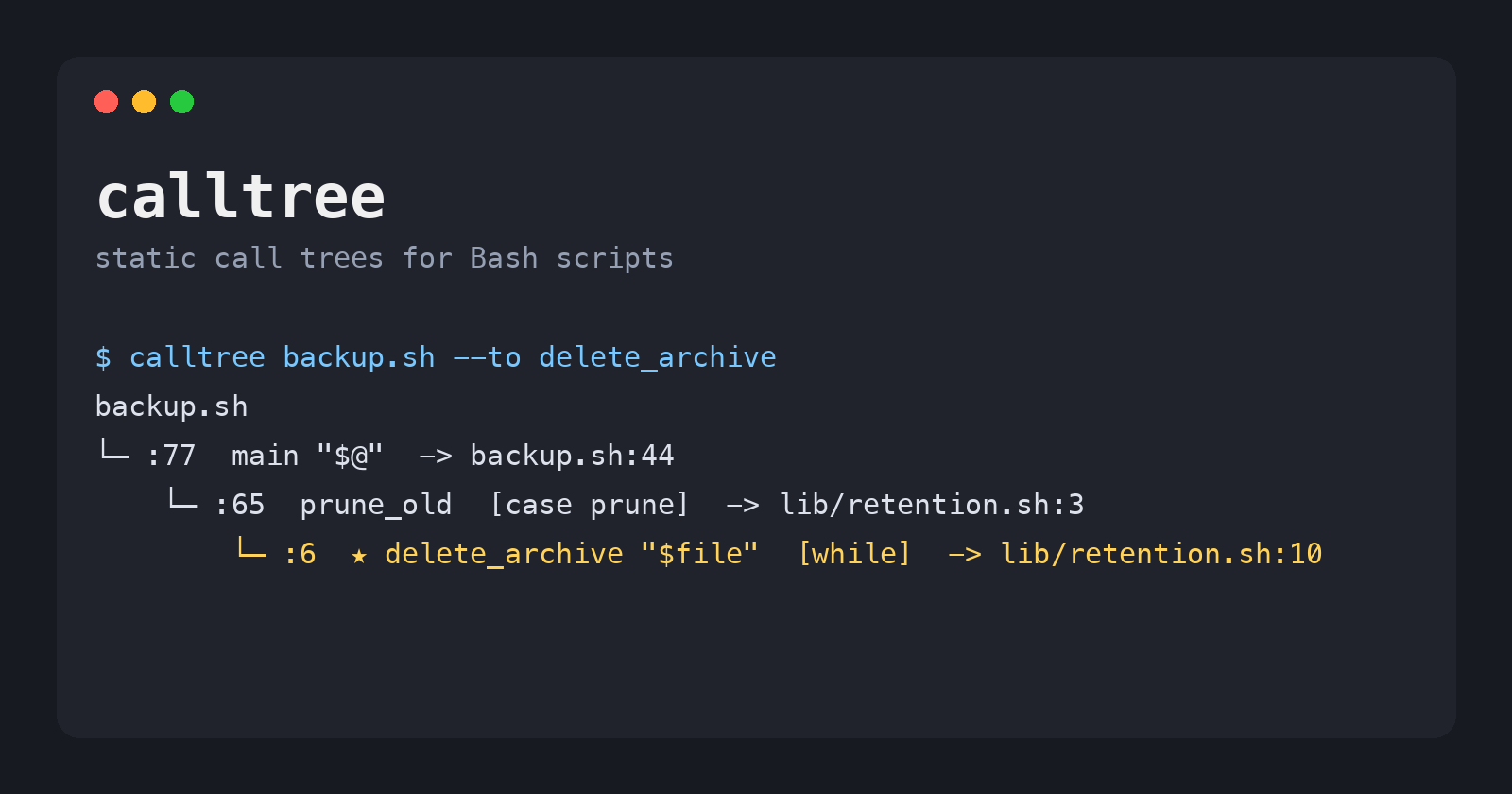
calltree reads a Bash project and prints which function calls which, in the order they run, with the file and line of every call. It never runs your script, so you can point it at a deploy or rebuild script without anything happening.
A shell script grows the same way every time. One file becomes main.sh plus a lib/ folder. Functions call functions that live in other files, and grep turns into the only map you have. The questions you actually ask are simple:
- What does
maindo, step by step? - Which path leads to the function that deletes things?
- Who calls
log, and from where?
calltree answers those from the source code. It follows source and . includes, finds every function, and marks the control flow around each call: [then], [||], [case backup], [trap EXIT] and so on. It is a single Python 3 file with no dependencies.
Install
You only need Python 3.9 or newer. Clone the repository and run the script directly:
git clone https://github.com/kpatr1981/calltree_server.git
cd calltree_server
python3 calltree.py --help
If you want images or animated GIFs, also install Graphviz, which provides the dot command:
sudo apt install graphviz     # Debian / Ubuntu
sudo dnf install graphviz     # Fedora / RHEL
brew install graphviz         # macOS
To run it from anywhere, link it into your PATH:
ln -s "$PWD/calltree.py" ~/.local/bin/calltree
The rest of this article runs it as calltree.
The example scripts
The repository ships two examples under examples/, and every command below runs against them.
hello.sh is one file with three functions:
greet() {
    local name=$1
    if [[ -z $name ]]; then
        shout "nobody to greet"
        return 1
    fi
    echo "Hello, $name"
}

shout() {
    echo "$1" | tr "[:lower:]" "[:upper:]" >&2
}

main() {
    for name in "$@"; do
        greet "$name" || shout "skipped an empty name"
    done
}

main "$@"
backup/ is closer to a real project. It is a small backup tool split across six files:
backup/
├── backup.sh              # argument parsing and main()
├── lib/
│   ├── log.sh             # log, warn, die
│   ├── config.sh          # load_config, require_tools
│   ├── archive.sh         # make, verify, list, restore archives
│   └── retention.sh       # prune_old, delete_archive
└── plugins/
    └── notify-mail.sh     # optional notifier, loaded from $NOTIFIER
backup.sh has four commands: backup, list, restore and prune. It sources its libraries through $(dirname "${BASH_SOURCE[0]}"), sets a trap for cleanup, and passes function names to a run_step helper. These are the patterns that make real scripts hard to follow by eye:
HERE=$(cd "$(dirname "${BASH_SOURCE[0]}")" && pwd)
source "$HERE/lib/log.sh"
source "$HERE/lib/config.sh"
source "$HERE/lib/archive.sh"
source "$HERE/lib/retention.sh"

NOTIFIER=${NOTIFIER:-}
if [[ -n $NOTIFIER ]]; then
    source "$NOTIFIER"
else
    notify() { :; }
fi
    case $1 in
        backup)
            [[ $# -eq 2 ]] || die "backup needs a source directory"
            run_step "Checking tools" require_tools tar gzip
            run_step "Archiving $2" make_archive "$2"
            run_step "Verifying" verify_archive "$LAST_ARCHIVE"
            notify "backup of $2 done: $LAST_ARCHIVE"
            ;;
It really works. Try ./backup.sh backup ../ and then ./backup.sh list.
Reading the tree
Give calltree the script you would run, and it prints everything that script can call, starting from the top level. Here is hello.sh:
$ cd examples
$ calltree hello.sh
hello.sh
└─ :24  main "$@"  -> hello.sh:18
    ├─ :20  greet "$name"  [for]  -> hello.sh:5
    │   └─ :8  shout "nobody to greet"  [then]  -> hello.sh:14
    └─ :20  shout "skipped an empty name"  [for] [||]  -> hello.sh:14
Each line is one call. Read :20 greet "$name" [for] -> hello.sh:5 as: on line 20 of the calling file, inside a for loop, greet is called, and greet is defined at hello.sh:5. The second shout only runs when greet fails, so it carries [||].
Now the backup tool. calltree follows the four source lines on its own:
$ cd backup
$ calltree backup.sh
warning: could not resolve `source "$NOTIFIER"` at backup.sh:21 (pass the file as an extra argument or use --var NAME=VALUE)
backup.sh
└─ :77  main "$@"  -> backup.sh:44
    ├─ :45  usage  -> backup.sh:26
    ├─ :46  load_config  -> lib/config.sh:3
    │   ├─ :6  die "cannot create $DEST"  [||]  -> lib/log.sh:11
    │   │   └─ :12  log "ERROR: $*"  -> lib/log.sh:3
    │   └─ :7  log "archives go to $DEST, kept…  -> lib/log.sh:3
    ├─ :47  cleanup $?  [trap EXIT]  -> backup.sh:30
    │   └─ :34  warn "finished with status $stat…  [then]  -> lib/log.sh:7
    │       └─ :8  log "WARNING: $*"  -> lib/log.sh:3
    ├─ :51  die "backup needs a source dire…  [case backup] [||]  -> lib/log.sh:11  ^ see lib/config.sh:6
    ├─ :52  run_step "Checking tools" require_tools tar gzip  [case backup]
    │   ├─ run_step()  -> backup.sh:38
    │   │   ├─ :40  log "$title"  -> lib/log.sh:3
    │   │   └─ :41  die "$title failed"  [||]  -> lib/log.sh:11  ^ see lib/config.sh:6
    │   └─ require_tools()  (via run_step)  -> lib/config.sh:10
    │       └─ :16  die "missing tools: ${missing[*…  [then]  -> lib/log.sh:11  ^ see lib/config.sh:6
    ├─ :53  run_step "Archiving $2" make_archive "$2"  [case backup]
    │   └─ make_archive()  (via run_step)  -> lib/archive.sh:3
    │       ├─ :5  die "not a directory: $src"  [||]  -> lib/log.sh:11  ^ see lib/config.sh:6
    │       └─ :11  log "wrote $LAST_ARCHIVE"  -> lib/log.sh:3
    ...
    ├─ :65  prune_old  [case prune]  -> lib/retention.sh:3
    │   └─ :6  delete_archive "$file"  [while]  -> lib/retention.sh:10
    │       └─ :12  log "deleted $(basename "$1")"  -> lib/log.sh:3
    ├─ :66  notify "pruned archives older than…  [case prune]  -> backup.sh:23
    ├─ :69  usage  [case -h|--help]  -> backup.sh:26
    └─ :72  die "unknown command: $1"  [case *]  -> lib/log.sh:11  ^ see lib/config.sh:6
This one screen shows the whole program. cleanup runs from a trap, run_step runs whichever function it is given, and prune is the only command that can reach delete_archive.
| Marker | Meaning |
|---|---|
:52 |
Line of the call, in the same file as the calling function |
-> lib/config.sh:10 |
Where the called function is defined |
(via run_step) |
A function name passed as an argument and run by run_step |
[then] [else] [for] [while] |
The block the call sits in |
[case backup] |
The case branch the call sits in |
[||] [&&] |
Runs only if the command before it failed or succeeded |
[trap EXIT] |
Registered with trap; runs when the signal arrives |
? after a marker |
The call is part of a condition, as in if check; then |
^ see :N |
Already expanded at that call site; --full repeats it |
… at the end |
Cut off by --depth |
The warning at the top is honest: calltree cannot know what $NOTIFIER will hold at run time. The next section shows how to tell it.
Narrowing it down
On a real project the full tree runs to hundreds of lines. These options cut it down to the question you are asking.
Start at one function, a few levels deep
-e picks the starting function, -d limits the depth and -H hides helpers you already understand:
$ calltree backup.sh -e main -d 1 -H log,warn,die
main()  -> backup.sh:44
├─ :45  usage  -> backup.sh:26
├─ :46  load_config  -> lib/config.sh:3
├─ :47  cleanup $?  [trap EXIT]  -> backup.sh:30
├─ :52  run_step "Checking tools" require_tools tar gzip  [case backup]
│   ├─ run_step()  -> backup.sh:38
│   └─ require_tools()  (via run_step)  -> lib/config.sh:10
├─ :53  run_step "Archiving $2" make_archive "$2"  [case backup]
│   ├─ run_step()  -> backup.sh:38
│   └─ make_archive()  (via run_step)  -> lib/archive.sh:3
...
├─ :65  prune_old  [case prune]  -> lib/retention.sh:3  …
├─ :66  notify "pruned archives older than…  [case prune]  -> backup.sh:23
└─ :69  usage  [case -h|--help]  -> backup.sh:26
That is the outline of main and nothing more. -I does the same as -H with a regular expression, for example -I '^(log|warn|die)$'.
Which path reaches a dangerous function?
--to keeps only the paths that end at the functions you name, and marks them with ★. Before you touch the code that deletes files, ask which command can reach it:
$ calltree backup.sh --to delete_archive
backup.sh
└─ :77  main "$@"  -> backup.sh:44
    └─ :65  prune_old  [case prune]  -> lib/retention.sh:3
        └─ :6  ★ delete_archive "$file"  [while]  -> lib/retention.sh:10
Only prune can reach it. -m gives the same ★ to functions you want to spot in a full tree without cutting the rest.
Who calls this function?
--callers lists every place a function is called, with the control flow at each one:
$ calltree backup.sh --callers die
backup.sh:41  in run_step()  die "$title failed"  [||]
backup.sh:51  in main()  die "backup needs a source directory"  [case backup] [||]
backup.sh:61  in main()  die "restore needs an archive"  [case restore] [||]
backup.sh:72  in main()  die "unknown command: $1"  [case *]
lib/config.sh:6  in load_config()  die "cannot create $DEST"  [||]
lib/config.sh:16  in require_tools()  die "missing tools: ${missing[*]}"  [then]
lib/archive.sh:5  in make_archive()  die "not a directory: $src"  [||]
lib/archive.sh:16  in verify_archive()  die "no such archive: $file"  [||]
That is every way the tool can exit with an error, in eight lines.
An index of every function
--list prints where each function is defined, how many calls it makes and how many places call it. --names prints just the names and a count:
$ calltree backup.sh --list
FUNCTION         DEFINED                      CALLS  CALLED-FROM
notify           backup.sh:23                     0            2
usage            backup.sh:26                     0            2
cleanup          backup.sh:30                     1            1
run_step         backup.sh:38                     2            3
main             backup.sh:44                    16            1
make_archive     lib/archive.sh:3                 2            1
verify_archive   lib/archive.sh:14                2            2
list_archives    lib/archive.sh:20                1            1
restore_archive  lib/archive.sh:28                1            1
load_config      lib/config.sh:3                  2            1
require_tools    lib/config.sh:10                 1            1
log              lib/log.sh:3                     0            8
warn             lib/log.sh:7                     1            2
die              lib/log.sh:11                    1            8
prune_old        lib/retention.sh:3               1            1
delete_archive   lib/retention.sh:10              1            1
A function with 0 in CALLED-FROM is either dead code or something only a trap or another script uses.
Sources that depend on a variable
The earlier warning came from source "$NOTIFIER". Give the variable a value with --var, and calltree loads that file too:
$ calltree backup.sh --var NOTIFIER=plugins/notify-mail.sh -e main -d 1 -I '^(log|warn|die)$'
warning: notify defined at backup.sh:23 and plugins/notify-mail.sh:3; using the last one
main()  -> backup.sh:44
...
├─ :55  notify "backup of $2 done: $LAST_A…  [case backup]  -> plugins/notify-mail.sh:3
...
notify now points into the plugin. The new warning is also correct: the script defines a fallback notify in its else branch, and Bash would use whichever ran last. You can also list extra files after the script name, for example calltree backup.sh plugins/notify-mail.sh.
External commands
By default you see only functions. -x adds every external command and builtin. -s tar,find adds just the ones you name, which is handy for finding every rm, psql or kubectl in a project.
Graphs, data and GIFs
The export options write a file instead of printing the tree. All the filters above still apply. Without -e or --to, an export covers the whole program. Use - as the file name to write to stdout.
A call graph
--graph draws one box per function, grouped by file. Solid arrows are direct calls, and dashed arrows are functions passed to another function. Every arrow is labelled with its order, line and control flow. Use .svg, .png or .pdf for an image (this needs Graphviz), or .dot for the raw Graphviz source:
calltree backup.sh --var NOTIFIER=plugins/notify-mail.sh \
    -e main -H log,warn,die --graph backup-graph.svg
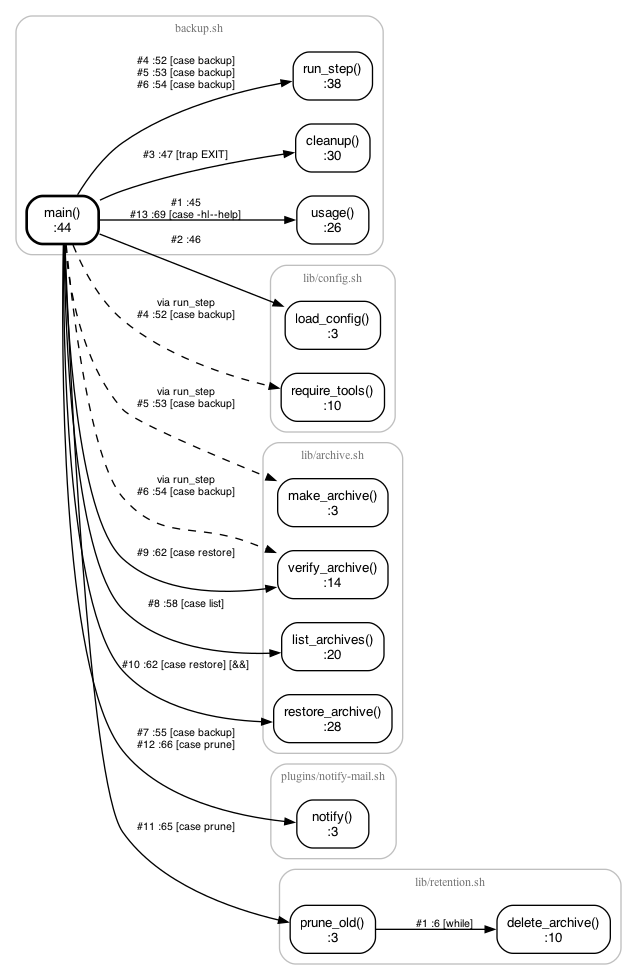
This is the picture you would draw on a whiteboard for a new team member, generated in under a second.
Watch it run, in order
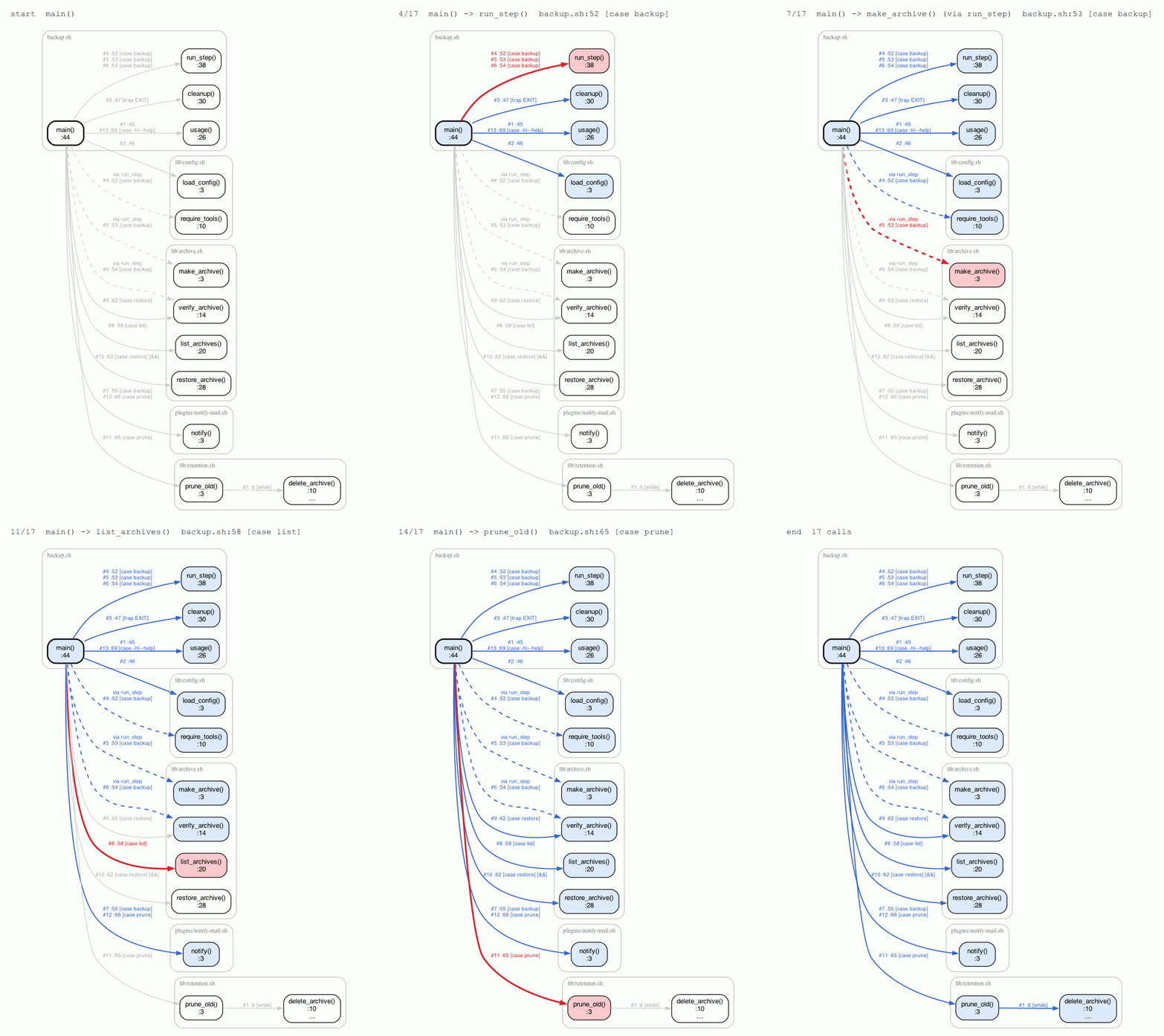
--animate makes a GIF that steps through the calls in the order they appear in the code. The current call is red and calls already made are blue. --delay sets the seconds per step:
calltree backup.sh --var NOTIFIER=plugins/notify-mail.sh \
    -e main -H log,warn,die -d 2 --animate backup-run.gif --delay 0.8
JSON and YAML for your own tools
--json and --yaml write every function with where it is defined, the calls it makes in order, and its callers:
$ calltree backup.sh -e prune_old --json -
{
  "script": "backup.sh",
  "entry": "prune_old",
  "functions": [
    {
      "name": "prune_old",
      "defined": "lib/retention.sh:3",
      "end": "lib/retention.sh:8",
      "calls": [
        {
          "order": 1,
          "kind": "function",
          "name": "delete_archive",
          "at": "lib/retention.sh:6",
          "command": "delete_archive \"$file\"",
          "defined": "lib/retention.sh:10",
          "tags": ["while"]
        }
      ],
      "called_by": []
    },
    ...
Pipe it into jq to answer questions the built-in options do not, or check it in CI to catch a new call path to a dangerous function.
Just the code that matters
--subset writes the source of only the functions in the selection, file by file. Combined with --to, it gives you everything a reviewer needs to read about one code path, and nothing else:
$ calltree backup.sh --to delete_archive --subset -
# calltree: 3 functions from backup.sh (static extract for reading; not meant to run as is)

# ===== backup.sh =====

# backup.sh:44
main() {
    ...
}

# ===== lib/retention.sh =====

# lib/retention.sh:3
prune_old() {
    ...
Using it from Claude Code
The repository also includes calltree_mcp.py, a small MCP server with no dependencies. With it, Claude Code (or any MCP client) can ask for a call tree itself instead of reading every file in your lib/ folder. Register it once:
claude mcp add calltree -- python3 /path/to/calltree_server/calltree_mcp.py
The server provides four tools:
| Tool | What it returns |
|---|---|
calltree_tree |
The call tree, with entry, to, depth, hide, ignore and externals filters |
calltree_callers |
Every call site of one function |
calltree_functions |
The function index from --list |
calltree_json |
The JSON export, for precise follow-up questions |
Each tool also takes vars, the same as --var. Now a question like “which command in backup.sh can delete files?” becomes one tool call that returns the four-line --to delete_archive tree, instead of the model reading six files to work it out.
Limits, and where to get it
calltree reads code. It does not run it, so keep these limits in mind:
- It does not evaluate conditions. Both sides of an
ifand everycasebranch are shown. - A
sourcepath or a function name stored in a variable is unknown until you pass--varor list the file yourself. It warns you instead of guessing. - Code built at run time, such as
eval "$cmd"with a variable or a function name read from a file, cannot be followed. - If a function is defined twice, it warns and uses the last definition, which is usually what Bash does too.
Within those limits, it turns “read the whole project” into a one-screen answer. Try it on your own scripts first with --list, then -e main -d 2, then --to on the function you are most afraid of.
The code, the examples and the MCP server are on GitHub at kpatr1981/calltree_server, under the MIT license. Issues and pull requests are welcome.
$ ls ./see-also/
$ ./buy-me-a-coffee ☕ // found this useful? I write these in my spare time