Docker: how to work with Grafana and influxdb

In this article i will show you how to create a docker-compose file that will create a Grafana and an influxdb instance
Create the following docker-compose.yml fileversion: '3'
services:
influxdb:
image: influxdb:1.6.4
container_name: influxdb
ports:
- 8086:8086
- 8088:8088
volumes:
- /db_graf/influxdb:/var/lib/influxdb
environment:
- INFLUXDB_DB=METRICS
- INFLUXDB_USERNAME=${INFLUXDB_USERNAME}
- INFLUXDB_PASSWORD=${INFLUXDB_PASSWORD}
networks:
- external_network
grafana:
image: grafana/grafana:latest
container_name: grafana
ports:
- 3000:3000
volumes:
- /db_graf/grafana-storage:/var/lib/grafana
- /db_graf/grafana-provisioning/:/etc/grafana/provisioning
depends_on:
- influxdb
environment:
- GF_SECURITY_ADMIN_USER=${GRAFANA_USERNAME}
- GF_SECURITY_ADMIN_PASSWORD=${GRAFANA_PASSWORD}
networks:
- external_network
networks:
external_network:
external: true
I will not explain everything since i assume you know the basics of Docker
- volumes: all volumes are bind volumes
I know that the right way is to mess with the uid of the users inside the container in order to set rights but in order to simplify things i just chmod 777 the dirs
chmod 777 grafana-storage
chmod 777 grafana-provisioning- environment: various variables that the docker images need, their source is a .env file in the same directory as the docker-compose.yml file, i have left some environment variables of influxdb empty since i didn't want a username and a password.
The .env fileINFLUXDB_DB=METRICS
GRAFANA_USERNAME=admin
GRAFANA_PASSWORD=admin
networks, both containers are attached to an external network named external_network, you need to create the network first.docker network create external_network
Start your containers with docker-compose up inside the docker-compose.yml pathdocker-compose up -d
if everything is ok you should see the containers up and running using docker ps
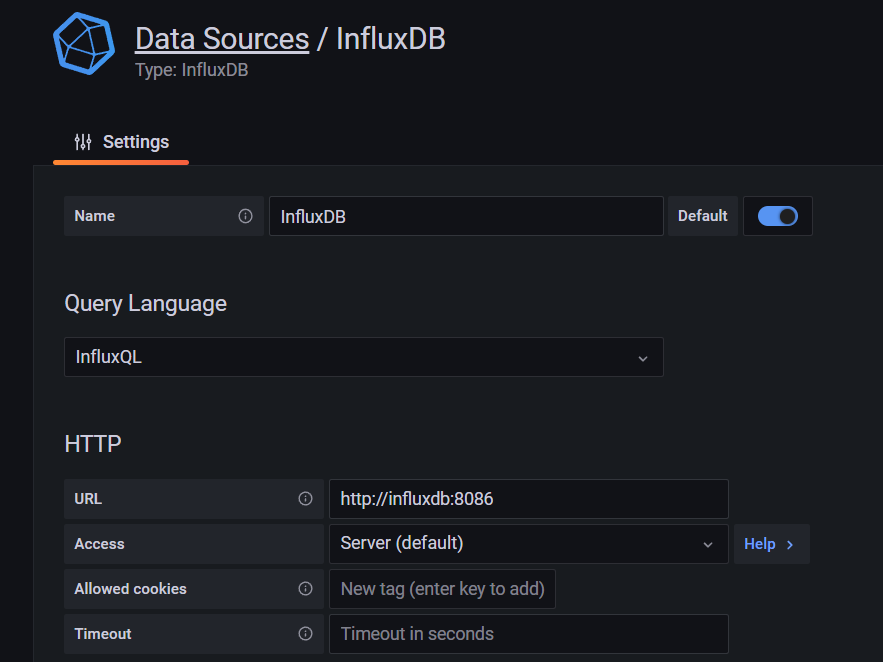
Grafana configuration
On the url you need to enter the influxdb container name and its port
I hope you found this short article easy to follow and save you a lot of time configuring Grafana and influxdb
$ ls ./see-also/
$ ./buy-me-a-coffee ☕ // found this useful? I write these in my spare time