Docker: see images size and how to clean-up
Docker images takes space in filesystem, lets do a test to get a better understanding, create the following DockerfileFROM alpine
RUN echo foo
RUN dd if=/dev/zero of=1g1.img bs=1G count=1
RUN dd if=/dev/zero of=1g2.img bs=1G count=1
RUN dd if=/dev/zero of=1g3.img bs=1G count=1
CMD /bin/true
Build the image with$ docker build . -t big_image
This docker file should create an image around ~3GB , lets verify this with docker df system command$ docker system df -v
Images space usage:REPOSITORY TAG IMAGE ID CREATED SIZE SHARED SIZE UNIQUE SIZE CONTAINERS
big_image latest f72061695ba5 About a minute ago 3.227GB 5.613MB 3.221GB 0
alpine latest 7731472c3f2a 2 days ago 5.613MB 5.613MB 0B 0
busybox latest b97242f89c8a 4 days ago 1.232MB 0B 1.232MB 0Containers space usage:CONTAINER ID IMAGE COMMAND LOCAL VOLUMES SIZE CREATED STATUS NAMESLocal Volumes space usage:VOLUME NAME LINKS SIZE
my-volume 0 6B
test 0 0BBuild cache usage: 0BCACHE ID CACHE TYPE SIZE CREATED LAST USED USAGE SHARED
We can see that big_image is around ~ 3GB.
Lets do a change on the Dockerfile, lets reduce the size to 2GB by commenting out the last dd commandFROM alpine
RUN echo foo
RUN dd if=/dev/zero of=1g1.img bs=1G count=1
RUN dd if=/dev/zero of=1g2.img bs=1G count=1
#RUN dd if=/dev/zero of=1g3.img bs=1G count=1
CMD /bin/true
Now rebuilding image$ docker build . -t big_image
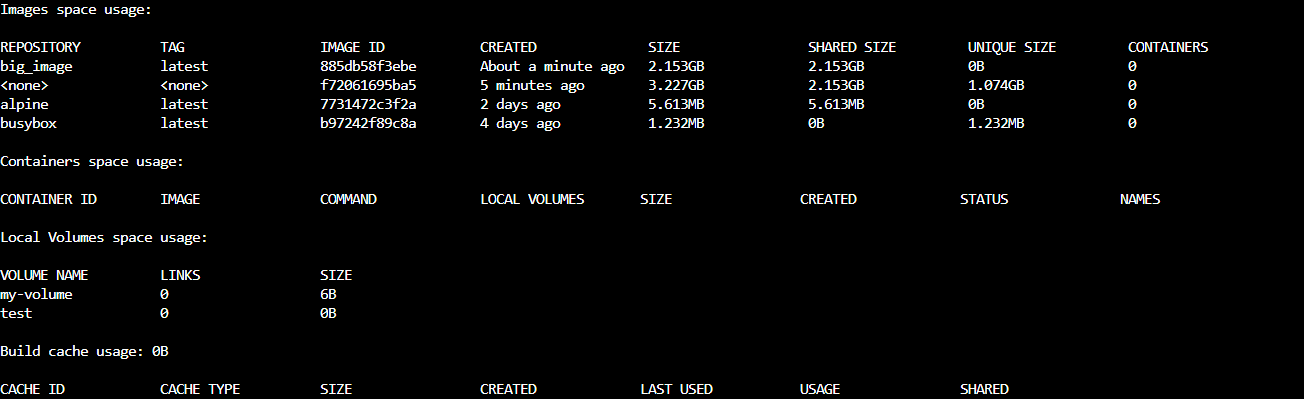
What do you believe will happen when we run docker system df -v again?
We can see that there is an <none> repository, this is a dangling image, is actually the one with the 3GB size and there are some ways to delete it
the first one is to use docker rmi IMAGE_ID and the second one is to use docker image prune$ docker image prune
WARNING! This will remove all dangling images.
Are you sure you want to continue? [y/N] y
Deleted Images:
deleted: sha256:f72061695ba5d0a6d00a30b1c5cc25861747dbd3f62c0a632190b3f4ff278615
deleted: sha256:f0f54b18fa08305e2704ead52c4a469c327e5c79c4fbe59f5980372b3a93c026
deleted: sha256:1036b37c2ea61576b37af09b3df5492af8cfec8f2ab72b6a7ff55f41093a4dd5Total reclaimed space: 1.074GB
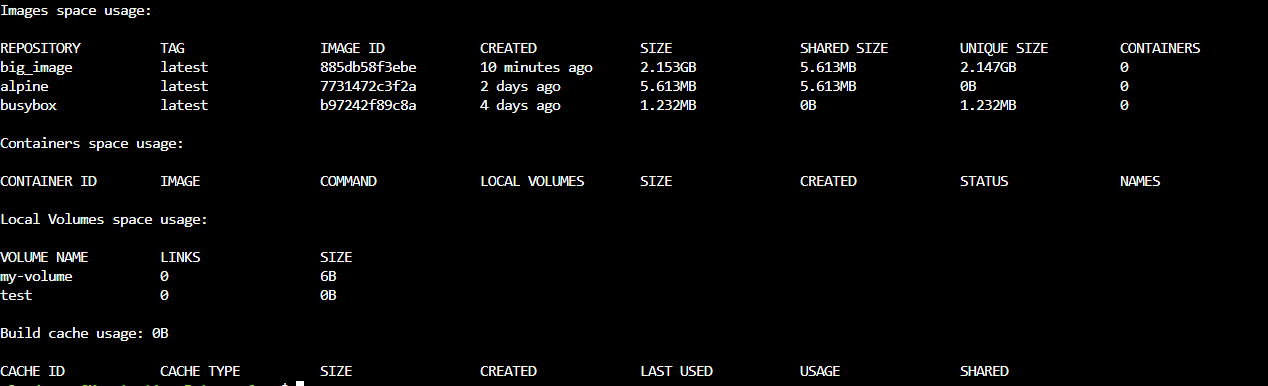
We reclaimed 1.074GB of disk space
Docker system df -v verifies that the dangling image does not exists any more
$ ls ./see-also/
$ ./buy-me-a-coffee ☕ // found this useful? I write these in my spare time