Docker swarm: High Availability
A Docker swarm is composed by nodes, nodes can be worker nodes or manager nodes.
Manager nodes: those nodes are key elements of the swarm, from those nodes you can do swarm administrative tasks, also are used to store the swarm state.
Worker nodes: those nodes are used to run the containers.
Note: that a manager node can be a worker also at the same time.
Docker swarm uses the Raft Consensus Algorithm to manage the global cluster state, Raft makes sure that all the manager nodes in the cluster who manage and schedule tasks are storing the same consistent state.
Having the same state across the cluster means that in case of a failure of the leader manager node any manager node can pickup-tasks and restore the services to a stable state, the state is propagated across the cluster manager nodes by replicating Raft logs.
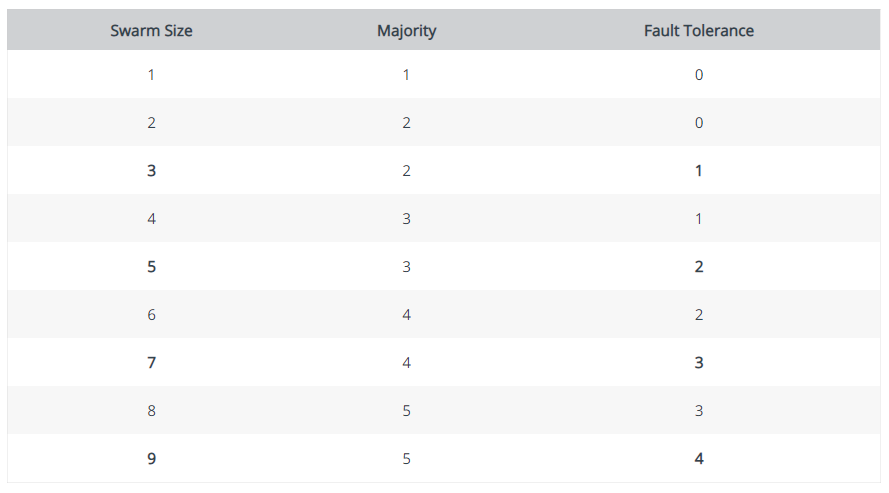
Raft tolerates up to “(N-1) / 2" failures and requires a majority of manager nodes to agree on values proposed to the cluster, which translates to “(N/2) + 1” manager nodes. This means that in a cluster of 5 manager nodes if 3 become un-available the cluster drop requests to schedule new tasks. The existing task will keep run but the cluster cannot rebalance tasks to overcome additional failures.
Things to consider before deploying manager nodes
- There is no limit on the number of manager nodes, but there is a trade-off between performance and fault tolerance, adding more manager nodes makes the swarm more fault tolerant, but reduces write performance because more nodes must acknowledge proposals to update the swarm state. This means more network round-trip traffic.
- When creating a swarm you must advertise your ip address to the other manager nodes in the swarm, managers are meant to be a stable component of the infrastructure and a static ip address for advertising must be used, if the manager changes its ip address the rest of the manager nodes will not succeed to contact to this manager node.
Fault — tolerance design
The number of manager nodes should be odd, having an odd number of managers ensures that after a failure the number of remaining manager nodes are “N/2 + 1”
Distribution of manager nodes
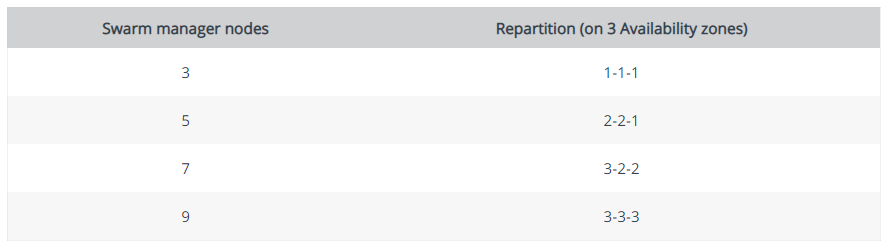
One important factor to consider is the distribution of manager nodes, for example if we have 3 manager nodes we can afford loosing only one manager node, so its a good practice to have those three manager nodes in three different locations that will not be affected by the same outage. If we have 5 manager nodes the managers should be in three different locations as well but the pairs of two should not run in the same server and this is because in case of a hardware fail that affects this server you will loose both manager nodes.
in case you use docker inside a virtualized environment and not in physical hardware things vary and you should design the distribution of manager nodes having in mind the failover mechanisms that the hypervisor might provide.
Common management operations
Create a docker swarm
To create a swarm you need to ssh to a docker server and enter the following
$ docker swarm init --advertise-addr <IP_ADDRESS>
Swarm initialized: current node (dxn1zf6l61qsb1josjja83ngz) is now a manager.

To add a worker to this swarm, run the following command:

    docker swarm join \
    --token SWMTKN-1-49nj1cmql0jkz5s954yi3oex3nedyz0fb0xx14ie39trti4wxv-8vxv8rssmk743ojnwacrr2e7c \
    IP_ADDRESS:2377

To add a manager to this swarm, run 'docker swarm join-token manager' and follow the instructions.
IP_ADDRESS must be an a static ip address of the server reachable within all docker servers that will join the swarm.
Add worker node to the swarm
To add a worker node to the swarm you need to ssh to a swarm manager first and enter the following
$ docker swarm join-token worker

To add a worker to this swarm, run the following command:

    docker swarm join \
    --token SWMTKN-1-49nj1cmql0jkz5s954yi3oex3nedyz0fb0xx14ie39trti4wxv-8vxv8rssmk743ojnwacrr2e7c \
    IP_ADDRESS:2377
Then the swarm manager will generate the command you need to run from the worker node to join the swarm.
Running this command from the worker node, should produce a message that indicates that the node joined the swarm.
$ docker swarm join \
  --token SWMTKN-1-49nj1cmql0jkz5s954yi3oex3nedyz0fb0xx14ie39trti4wxv-8vxv8rssmk743ojnwacrr2e7c \
  192.168.99.100:2377

This node joined a swarm as a worker.
To verify that the worker node has joined the swarm you can run from the manager$ docker node lsID HOSTNAME STATUS AVAILABILITY MANAGER STATUS 03g1y59jwfg7cf99w4lt0f662 worker2 Ready Active 9j68exjopxe7wfl6yuxml7a7j worker1 Ready Active dxn1zf6l61qsb1josjja83ngz * manager1 Ready Active Leader
You should see the hostname of the worker, status, availability and role which should be blank since it joined the swarm as a worker.
Add a manager node to the swarm
To add a manager node the procedure is like adding a worker node, but the command you need to run to the swarm manager to generate the command to join a docker node as a manager is the following
docker swarm join-token managerRejoin manager node to the swarm
There might be cases that the node has become unstable does not respond well, if you have concluded that the problem is the node a solution is to force the swarm from a clean state, to do this enter$ docker node demote <NODE>
$ docker node rm <NODE>
The first command will demote the manager node to a worker, the second one will remove the node from the swarm, in case that the command does not execute because the server is not responding or any other problem you can force the command to the swarm
$ docker node rm --force <NODEThen after you resolve the underlying issue you can re-join the swarm as a manager node or as a worker
Note: before you delete the node make sure that the number of nodes are odd
Run manager only nodes
By default manager nodes act as worker nodes. this means that those nodes will run containers and container tasks, this is not a problem if you run on those nodes non resource intensive containers or the containers use cpu and memory constraints, but if the load is very high this can be a problem for the Raft algorithm to replicate data in a consistent way and this can cause problems to swarm heartbeat and leader elections.
To avoid interference with manager operations you can mark them unavailable for worker operations, to do this enter$ docker node update --availability drain <NODE>
Demote manager node to worker$ docker node demote <NODE>
Promote worker node to manager$ docker node promote <NODE>
Monitor swarm health
A basic command to monitor the swarm health$ docker node lsID HOSTNAME STATUS AVAILABILITY MANAGER STATUS 03g1y59jwfg7cf99w4lt0f662 worker2 Ready Active 9j68exjopxe7wfl6yuxml7a7j worker1 Ready Active dxn1zf6l61qsb1josjja83ngz * manager1 Ready Active Leader
This command can summarize the health status of each node of the swarm
View running containers of the swarm nodes
NAME                                IMAGE        NODE            DESIRED STATE  CURRENT STATE
redis.1.7q92v0nr1hcgts2amcjyqg3pq   redis:3.0.6  swarm-manager1  Running        Running 5 hours
redis.6.b465edgho06e318egmgjbqo4o   redis:3.0.6  swarm-manager2  Running        Running 29 seconds
redis.7.bg8c07zzg87di2mufeq51a2qp   redis:3.0.6  swarm-manager3  Running        Running 5 seconds
redis.9.dkkual96p4bb3s6b10r7coxxt   redis:3.0.6  swarm-worker1  Running        Running 5 seconds
redis.10.0tgctg8h8cech4w0k0gwrmr23  redis:3.0.6  swarm-worker2  Running        Running 5 seconds
This command can provide details like state and how long it runs for each of the running containers of nodes.
I hope you found the article interesting :)
$ ls ./see-also/
$ ./buy-me-a-coffee ☕ // found this useful? I write these in my spare time