How to calculate percentage change between values using pandas

Calculating percentage difference between values in pandas is a very common task, in this article i will show you some examples one how you can perform such tasks in an easy and efficient manner, lets start!
Calculate the percentage difference between values of a column
Assume that we have a dataframe with one column of 10 integer values ranging from 1 to 100, and we want to add another column to the dataframe that will indicate the percentage change of the values, to create a dataframe with one column with 10 integer values is very easy
import pandas as pd
import random

# Generate 10 random integer values from 1 to 100
random_data = [random.randint(1, 100) for _ in range(10)]
df = pd.DataFrame(random_data, columns=['Values'])
Now we have the dataframe the next step is to calculate a column with the percentage change of each value from the previous value, to do this we will use the .pct_change() function to the Values column and multiply the result with 100.
# Calculate the percentage change and add it as a new column
df['PctChange'] = df['Values'].pct_change() * 100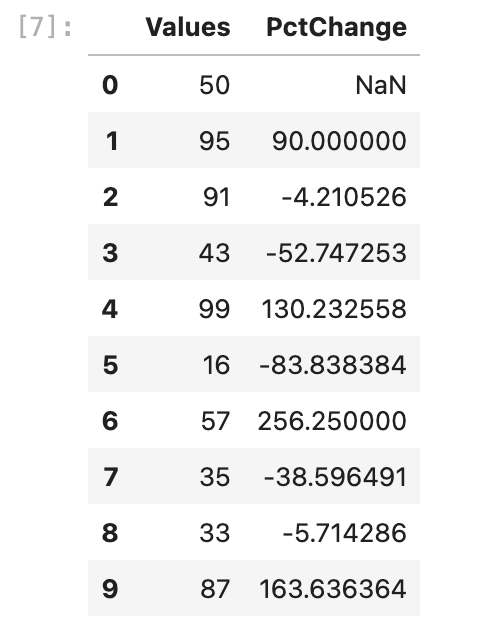
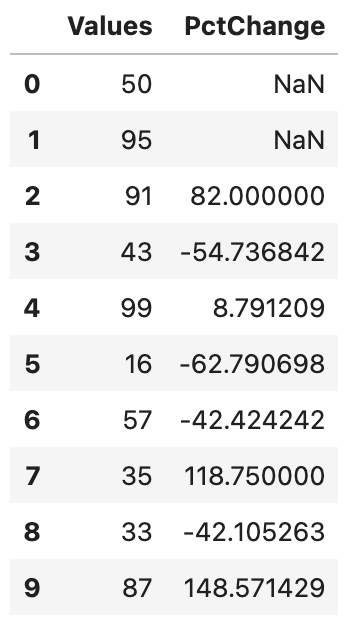
Now lets make things a bit more complicate, what if we wanted to calculate the percentage difference not by every row but every second row, to do this we can use the periods option!
df['PctChange'] = df['Values'].pct_change(periods=2) * 100This will calculate the percentage difference of row versus every second row
Calculate the percentage difference between two columns of the same dataframe
Now assume that we have two columns and we need to calculate the percentage difference between the correspoding values of the columns, lets create first our dataframe
import pandas as pd
import random

# Generate 10 random integer values from 1 to 100
random_data_1 = [random.randint(1, 100) for _ in range(10)]
random_data_2 = [random.randint(1, 100) for _ in range(10)]
df = pd.DataFrame(random_data, columns=['Values1'])
df['Values2'] = random_data_2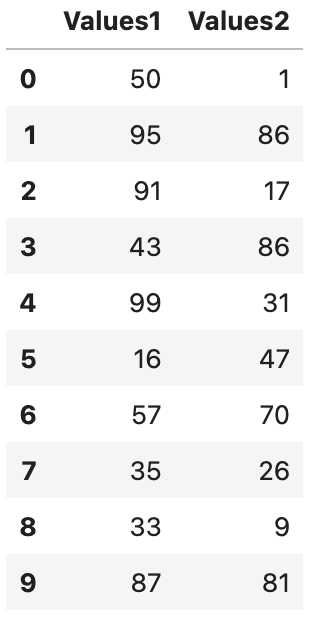
Now lets calculate the percentage difference which is a very straight forward math operation!
df['Percentage_Diff'] = ((df['Values2'] - df['Values1']) / df['Values1']) * 100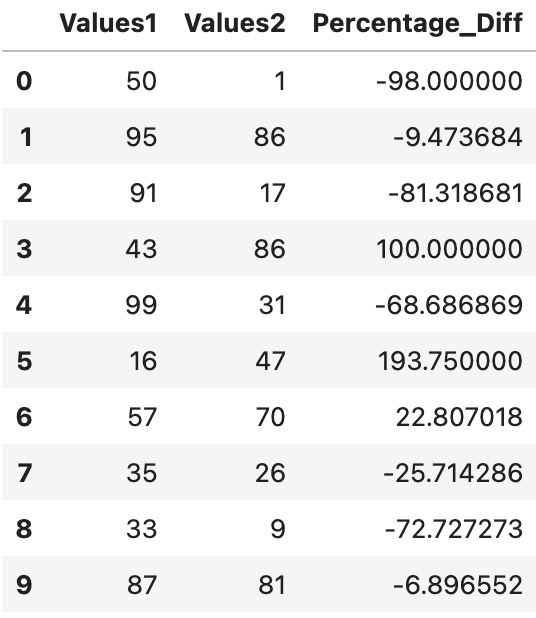
Conclusion
Calculating percentage change of rows is a very essential but easy task! i hope this article made it clear for you on how to achieve this!
$ ls ./see-also/
$ ./buy-me-a-coffee ☕ // found this useful? I write these in my spare time