How To Use ThreadPoolExecutor in Python
There are several ways to run parallel tasks in Python. Threads in python are well suited for applications that the parallel tasks are I/O bound.
An example of an I/O bound application is making HTTP requests or reading from disk. This article I 'will explain how we can use ThreadPoolExecutor for executing code in threads.
First we need to install the requests library using pippip3 install requests
Create the following file as parallel_requests.py
Explaining the code
The concurrent.futures library provide us the ThreadPoolExecutor which creates the thread pool.#!/usr/bin/env python3
import concurrent.futures
import requests
import random
import string
import time
import os
This part of code is a list with the urls that we will perform a get requesturls = [
"https://en.wikipedia.org/wiki/Greece",
"https://en.wikipedia.org/wiki/Aegean_Islands",
"https://en.wikipedia.org/wiki/Macedonia_(Greece)",
"https://en.wikipedia.org/wiki/Central_Greece",
"https://en.wikipedia.org/wiki/Peloponnese",
"https://en.wikipedia.org/wiki/Thessaly",
"https://en.wikipedia.org/wiki/Epirus_(region)"
]
This small portion of code instructs python to create a directory named data inside, this is where we will store the get responsetry:
os.mkdir(".\data\\")
except Exception as ex:
pass
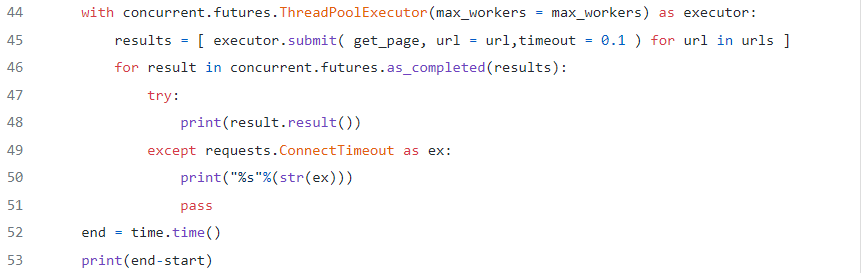
- This is the most important part of our script, line “44” instructs ThreadPoolExecutor to create a thread pool of “max_workers”, “max_workers” is the maximum number of parallel tasks will executed at the same time.
- line “45” is a list comprehension which starts the threads by calling in parallel a number equal of “max_workers” get_page fuctions, the url parameter is iterated through the urls list we had defined.
- line “46” loops the completed tasks and prints the returned results as soon as they arrive.
- line “49” is used in order to catch ConnectionTimeout exceptions from the get_page function
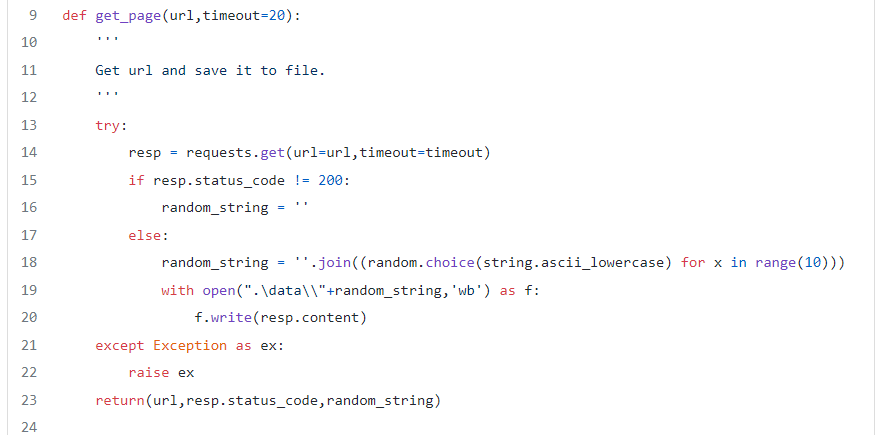
The get_page function is quite simple
- line “14” does the HTTP GET request towards the url until completion or a timeout exception
- line “21” catches the time out exception and just raise it again in order to cached by line “49”
- line “23”, if no exception occurs the function returns the url, response status and the filename we stored the content of the response
Lets see our script in action, what do you believe will happen?

We can see that the script returns a time out exception for each request, but why? if you close notice you will see that the timeout value in line 45 is set to 0.1 which is a very small number, you might wonder why i set so small number, just to show to you the correct way to manage the exception in this case.
Since we might do thousands of HTTP requests we don't want an exception handling which will occur our program to terminate, so in this case we just print a message with the error (we could even log those time out exceptions) and let the program to continue, if we did something like sys.exit() this would make the program to exit

Change the timeout parameter to something more realistic like 10 seconds and re-run the program

From the output we can see that all 7 requests completed in ~ 6 seconds

What will happen if we change the “max-worker” parameter to 3?

We can see that we need ~ 9.6 seconds now

I hope now that you have an understanding of how tunning the number of workers can affect the total execution time of the parallel tasks. of course an individual task might take more time than other tasks together to be completed but you still can minimize the total time needed.
$ ls ./see-also/
$ ./buy-me-a-coffee ☕ // found this useful? I write these in my spare time