Linux: How to colorize text in bash scripts

Assume the following scenario, you want to create a script that will colorize strings! simple right? and it is simple but we need first to learn more about ANSI color codes, let's start!
ANSI color codes
ANSI color codes are sequences of characters that define text styles such as colors in terminal emulators. The codes are part of the ANSI escape sequences, which start with ESC represented as \x1b in bash, followed by specific codes that control text color. The general format for an ANSI escape code is
\x1b[<code>mWhere:
\x1bis the ESC character[...mis the sequence that sets colors
The numbers inside the bracket define the color value
\x1b[30m: Black\x1b[31m: Red\x1b[32m: Green\x1b[33m: Yellow\x1b[34m: Blue\x1b[35m: Magenta\x1b[36m: Cyan\x1b[37m: White
After applying a color to a text then you need to reset the color, the reset code is
x1b[0m
It's important to use it so that the color doesn't affect the rest of the terminal output.
Creating the tool
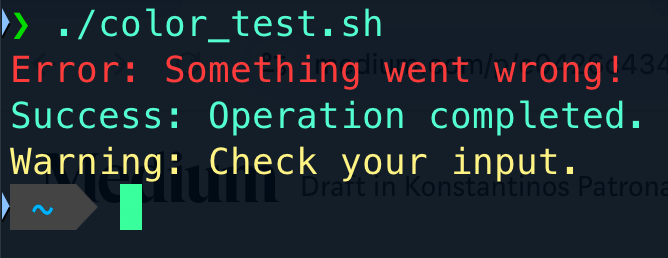
Now that we know how what ANSI colors are let's do some experiments, save the following as color_test.sh , make it executable with chmod +x ./color_test.sh and run it, it should produce the following colorful output
#!/bin/bash

RED='\033[31m'
GREEN='\033[32m'
YELLOW='\033[33m'
RESET='\033[0m'

echo -e "${RED}Error: Something went wrong!${RESET}"
echo -e "${GREEN}Success: Operation completed.${RESET}"
echo -e "${YELLOW}Warning: Check your input.${RESET}"
Conclusion
Adding colors to bash scripts is a convenient feature, it can make your script output more readable and focus to what is important!
$ ls ./see-also/
$ ./buy-me-a-coffee ☕ // found this useful? I write these in my spare time