Pandas: How to do data cleaning for beginners

Preparing our data for analysis / reporting takes most of the task time, but what to clean? how to clean them using Pandas functionality and not re-invent the wheel by using pure python functionality?
I have prepared some examples that i hope you will find the useful and save you a lot of time!.
Example 1: Open a CSV and parse a column with a date
- parse_dates: We define the column name that we want to be parsed as a datetime object
- df.dtypes: Show us the data types of the dataframe>> df = pd.read_csv('toClean.csv', parse_dates=['HireDate'])
>> print(df.dtypes)First-Name object
Last-Name object
Year-Of-Birth object
Gender object
Dpt object
A object
B object
HireDate datetime64[ns]
LastDateLogin object
LastTimeLogin object
dtype: objectprint(df)

Example 2: How to drop a columns by name
We might not need one or more columns in our report, lets remove columns “A” and “B”
- to_drop: a list with the column names we want to remove from the dataframe
- inplace: directly modify the dataframe
- axis: perform the change in columns>> to_drop = ['B','A']
>> df.drop(to_drop, inplace=True, axis="columns")
>> print(df.dtypes)First-Name object
Last-Name object
Year-Of-Birth object
Gender object
Dpt object
HireDate datetime64[ns]
LastDateLogin object
LastTimeLogin object
dtype: object
A and B columns removed from the dataframe>> print(df)

Example 3: Custom datetime parser
Looking at the csv file we can see that there are two columns “LastDateLogin” and “LastTimeLogin”, we will create a new datetime64 field in the named “LoginTS” which will be created from the concatenation of “LastDateLogin” and “LastTimeLogin”,>> df["LoginTS"] = pd.to_datetime(df["LastDateLogin"] +" "+df["LastTimeLogin"],format='%Y-%m-%d %H:%M')
>> df.drop(['LastDateLogin','LastTimeLogin'], inplace=True,axis="columns")
>> print(df.dtypes)First-Name object
Last-Name object
Year-Of-Birth object
Gender object
Dpt object
HireDate datetime64[ns]
LoginTS datetime64[ns]
dtype: object>> print(df)

Example 4: Check if values of column are unique
Lets find out if the newly created “LoginTS” have unique values
- is_unique: returns True or False depending if values in column are unique or not.>> print(df['LoginTS'].is_unique)
False
Example 5: Change the index of a dataframe
To change the index of a dataframe we can use the set_index function
Our original dataframe:>> print(df)

In this case we want to index our dataframe based on the “LoginTS” field>> df.set_index(df['LoginTS'], inplace=True)
>> print(df)

Did you notice that despite that we set as index the “LoginTS” field the column “LoginTS” field still exists? to remove the column “LoginTS” we drop the column.>> df.drop(['LoginTS'], inplace=True, axis="columns")
>> print(df)
Example 6: Fix the Year-of-Birth field
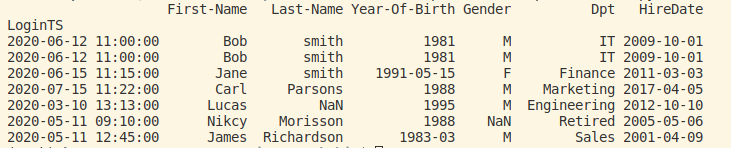
Because of data entry errors the Year-of-Birth field does not contain only the yeat in some rows. To fix this we can use some regular expressions magic and the .str.extract function.
- .str.extract: This function extracts string from field that matches a pattern
- r’^(\d{4})’: This regular expression matches 4 digits in row>> clean_year_of_birth = df['Year-Of-Birth'].str.extract(r'^(\d{4})', expand = False)
Then using the pd.to_numeric function we can apply the extract result to each value of the column>> df['Year-Of-Birth'] = pd.to_numeric(clean_year_of_birth)
>> print(df)

As we can see all Year-of-Birth values have a length of 4 digits, which is the year.
Example 7: Replace NaN values of Gender column
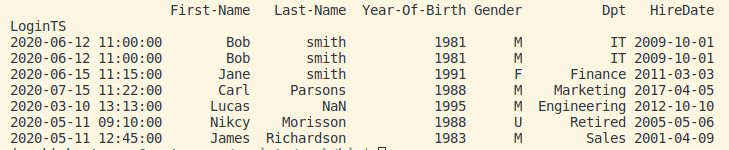
By error, there is no value M or F at Gender column for some rows, we want to replace NaN with “U”. Pandas provides a handy function to replace NaN values, the fillna function.>> df[‘Gender’].fillna(‘U’,inplace=True)
>> print(df)
Example 8: Drop rows where a column value is NaN
In this case “Last-Name” on some rows is NaN, that renders data unusable, so its better to remove those rows.>> print(df)
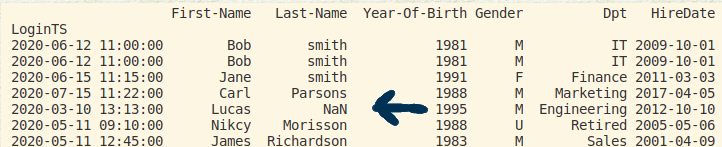
To remove those rows we will use the dropna function
- subset: defines the values of the column to be checked for NaN values
- inplace=True: apply changes to the dataframe directly
>> df.dropna(subset=['Last-Name'],inplace=True)
>> print(df)

Example 9: Show rows with duplicated values of a specific column and how to drop them
subset: Defines which column we want to check for duplicate values
keep: This option can be “first”,”last” or False
- first: means return the first of the duplicate rows
- last: means return the last of the duplicate rows
- False: means return all rows>> print(df[df.duplicated(subset=['LoginTS'],keep=False)])

To drop them we can use the drop_duplicates function>> df.drop_duplicates(keep = “last”, inplace = True)
>> print(df)

We can see that there are no any duplicate rows in our dataframe
This was a short, but i believe to the point examples on how to perform data cleaning operations on your data!.
$ ls ./see-also/
$ ./buy-me-a-coffee ☕ // found this useful? I write these in my spare time