Python: Create a web server to share files in just one line!

Assume the following scenario! you need quickly to share files with users, but you don't have the time to set a mechanism that will transfer files to them, and as usually users tend to be in-patient :) well users always have web browsers in their computers, and we can use this for our own benefit; what i tell you that you can create a Web server in Python with zero configuration and zero effort! ofc this is not a permanent solution but rather a quick hack to make things move while you have the time to design a more permanent solution.
No need to install additional modules
Python3 has the http.server module already included in the standard library; this means that we don't need to install anything.
Prerequisites
You just need to create a directory that will host your files, the only things you need to have in mind are
- The user who will run Python needs to have read access to the directory and the files that you want to share.
- Use a port over 1024 if you run Python as a non — root user.
- Ensure that the ip address/port of the computer that will run the Python web server is not blocked by a firewall.
- Ensure that users can reach the Python Web server IP Address.
Come on! just give the the one-liner
Create the directory that will keep the files$ mkdir web_test
Create the files in the directory with some content$ echo "hello from python" > hello.html
$ echo "another file" > file.txt
Start the Web server, listen to port 8888.$ cd ./web_test/ && python3 -m http.server 8888
Serving HTTP on 0.0.0.0 port 8888 (http://0.0.0.0:8888/) ...
Now open a web browser and go to this computer ip address, for testing/debugging purposes you can access the web server its own localhost address
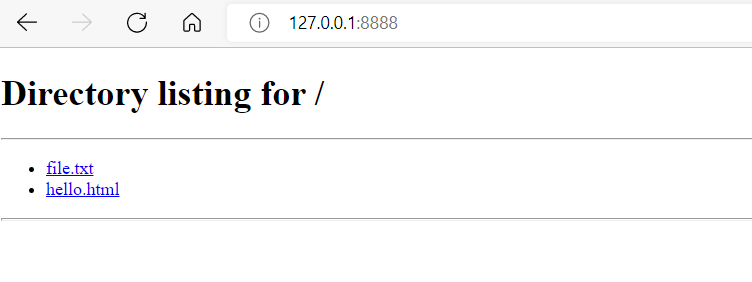
This tiny web server also logs on screen incoming requests and their response statuses

I hope you found this article as exciting as i felt when i learned that Python includes a web server.
$ ls ./see-also/
$ ./buy-me-a-coffee ☕ // found this useful? I write these in my spare time