Create REST APIs with FastAPI

A REST API (also known as RESTful API) is an application programming interface (API or web API) that conforms to the constraints of REST architectural style and allows for interaction with RESTful web services. REST stands for representational state transfer and was created by computer scientist Roy Fielding. In this article, we will learn how to create such an API using Python FastAPI.
What is FastAPI
FastAPI is a modern, fast (high-performance) web framework for building APIs with Python 3.7+ based on standard Python-type hints.
The key features are:
- Fast: Very high performance, on par with NodeJS and Go (thanks to Starlette and Pydantic). One of the fastest Python frameworks available.
- Fast to code: Increase the speed to develop features by about 200% to 300%. *
- Fewer bugs: Reduce about 40% of human (developer) induced errors. *
- Intuitive: Great editor support. Completion everywhere. Less time debugging.
- Easy: Designed to be easy to use and learn. Less time reading docs.
- Short: Minimize code duplication. Multiple features from each parameter declaration. Fewer bugs.
- Robust: Get production-ready code. With automatic interactive documentation.
- Standards-based: Based on (and fully compatible with) the open standards for APIs: OpenAPI (previously known as Swagger) and JSON Schema.
REST API description
In this example, we will create a REST api that will perform basic CRUD operations (Create / Read / Update / Delete) towards a dictionary (a fake in memory database), this dictionary will contain “students” with their name and age
students    = {}
students[1] = {'name': 'Student 1', 'age': 20}
students[2] = {'name': 'Student 2', 'age': 21}
students[3] = {'name': 'Student 3', 'age': 22}
If you don’t already have FastAPI installed, you can install it using pip3
$ pip3 install fastapiCreate the following file and name it rest_example.py
#!/usr/bin/env python3
from fastapi import FastAPI,APIRouter,Response
from pydantic import BaseModel
import uvicorn

app = FastAPI(title = "REST API Example.", openapi_url = "/openapi.json")
api_router = APIRouter()

class StudentRecord(BaseModel):
    name: str
    age: int

students    = {}
students[1] = {'name': 'Student 1', 'age': 20}
students[2] = {'name': 'Student 2', 'age': 21}
students[3] = {'name': 'Student 3', 'age': 22}

def get_student(student_id):
    """
    Get student data.
    """
    if student_id in students.keys():
        return students[student_id]
    else:
        return False

@api_router.get("/students/{student_id}")
def get_endpoint(student_id:int) -> dict:
    """ GET Request """
    # Init the response message
    response                = {}
    response['body']        = {}
    response['status_code'] = 0
    # Get data
    data = get_student(student_id=student_id)
    if data != False:
        response['body'] = data
        response['status_code'] = 200
    else:
        response['body'] = {'error':'student_id not found'}
        response['status_code'] = 404
    return Response(content     = str(response['body']),
                    media_type  = "application/json",
                    status_code = response['status_code'])

@api_router.get("/students/")
def get_endpoint() -> dict:
    """ GET Request """
    # Init the response message
    response                = {}
    response['body']        = students
    response['status_code'] = 200
    return Response(content     = str(response['body']),
                    media_type  = "application/json",
                    status_code = response['status_code'])

@api_router.post('/students/{student_id}')
async def post_endpoint(student_id:int,student: StudentRecord) -> dict:
    """ POST Request """
    response                = {}
    response['body']        = {}
    response['status_code'] = 0
    if student_id in students.keys():
        response['body']        = {'error':"student_id %s exists"%(student_id)}
        response['status_code'] = 409
    else:
        student = dict(student)
        students[student_id] = {'name': student['name'], 'age':student['age']}
        response['status_code'] = 201
        response['body']        = {'info':"student_id %s record created."%(student_id)}
    return Response(content     = str(response['body']),
                    media_type  = "application/json",
                    status_code = response['status_code'])

@api_router.put('/students/{student_id}')
async def put_endpoint(student_id:int,student: StudentRecord) -> dict:
    """ PUT Request """
    response                = {}
    response['body']        = {}
    response['status_code'] = 0
    if student_id in students.keys():
        student = dict(student)
        students[student_id] = {'name': student['name'], 'age':student['age']}
        response['status_code'] = 200
        response['body']        = {'info':"student_id %s record modified."%(student_id)}
    else:
        response['body']        = {'error':"student_id %s does not exist"%(student_id)}
        response['status_code'] = 404
    return Response(content     = str(response['body']),
                    media_type  = "application/json",
                    status_code = response['status_code'])

@api_router.delete('/students/{student_id}')
async def del_endpoint(student_id:int) -> dict:
    """ DEL Request """
    response                = {}
    response['body']        = {}
    response['status_code'] = 0
    if student_id in students.keys():
        del(students[student_id])
        response['status_code'] = 200
        response['body']        = {'info':"student_id %s record deleted."%(student_id)}
    else:
        response['body']        = {'error':"student_id %s does not exist"%(student_id)}
        response['status_code'] = 404
    return Response(content     = str(response['body']),
                    media_type  = "application/json",
                    status_code = response['status_code'])

app.include_router(api_router)

if __name__ == '__main__':
    uvicorn.run(app, host = "0.0.0.0", port = 8001, log_level = "debug")
The first 4 lines define the Python interpreter that will be used and the needed libraries.
The following lines re used to initialize FastAPI and create a router object for our api
app = FastAPI(title = "REST API Example.", openapi_url = "/openapi.json")
api_router = APIRouter()
Those lines define the data class of the request; itis used by pydantic to do input validation. In real life examples it could also contain UUIDs for the client to be able to match the response with requests, also could contain an authorization token and a timestamp.
class StudentRecord(BaseModel):
    name: str
    age: int
This is a helper function used by the API to help retrieve records for a given key
def get_student(student_id):
    """
    Get student data.
    """
    if student_id in students.keys():
        return students[student_id]
    else:
        return False
Now let’s talk a bit about the HTTP requests that our API uses.
- GET requests are used to read data, in this case, are used to retrieve a specific student based on its id or to retrieve all students.
- POST requests are used to create data, in our case, to create a new student.
- PUT requests are used to update existing data, in our case, to update the data of an existing student.
- DELETE requests are used to delete data, in our case, to delete an existing student.
Explaining the GET requests
- The first get function accepts a student_id in the URL; then the helper function retrieves the data; if data exists, its placed in the response dictionary along with an HTTP code of 200, else an error message is placed along with an HTTP code of 404 not found, the response dictionary will be automatically converted to JSON.
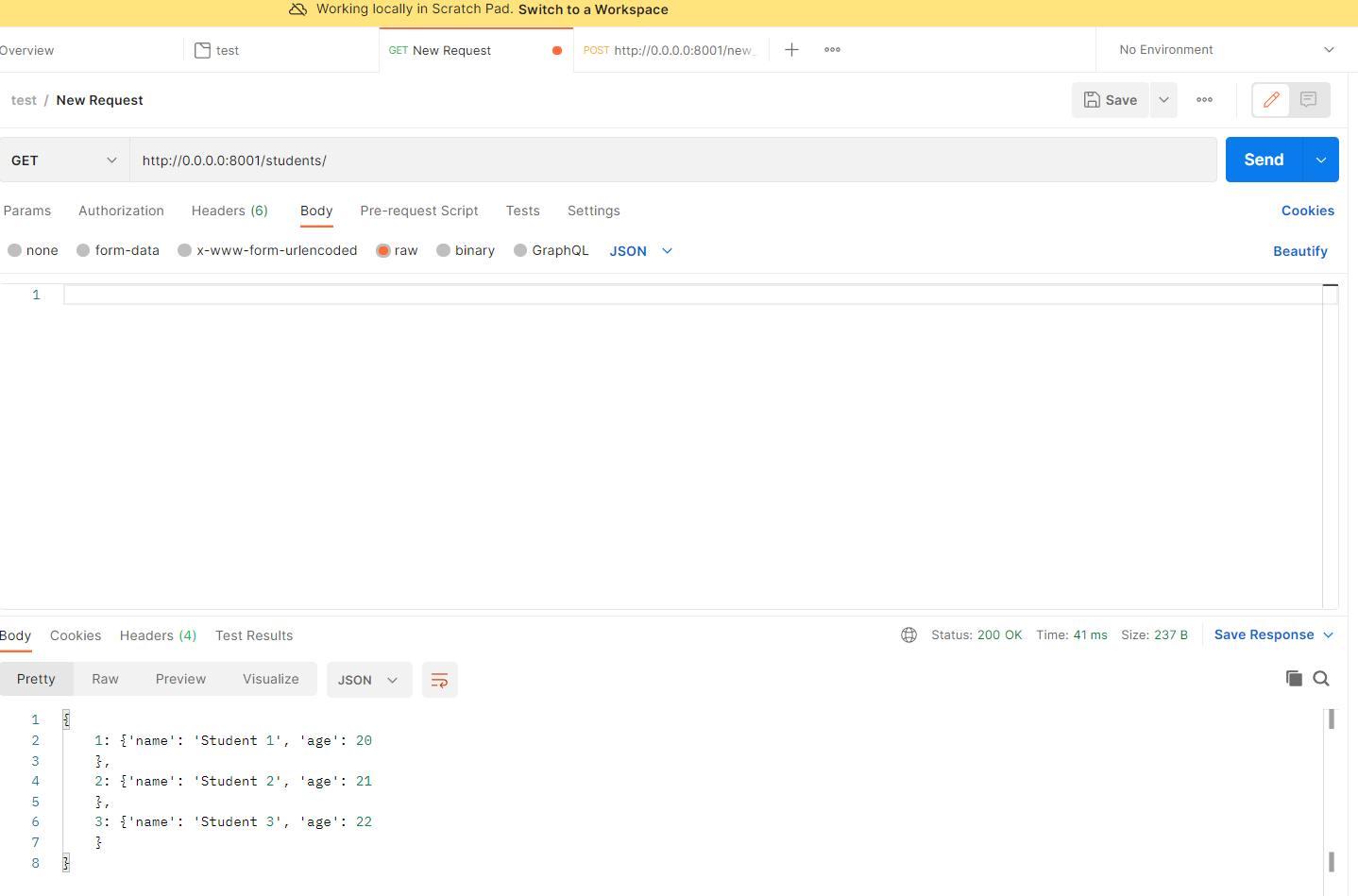
- The second function does not accept any parameters in the URL; it’s somehow a dummy; it just returns the dictionary with the students back; in real-life examples, this might require a pagination technique to accommodate many records.
@api_router.get("/students/{student_id}")
def get_endpoint(student_id:int) -> dict:
    """ GET Request """
    # Init the response message
    response                = {}
    response['body']        = {}
    response['status_code'] = 0
    # Get data
    data = get_student(student_id=student_id)
    if data != False:
        response['body'] = data
        response['status_code'] = 200
    else:
        response['body'] = {'error':'student_id not found'}
        response['status_code'] = 404
    return Response(content     = str(response['body']),
                    media_type  = "application/json",
                    status_code = response['status_code'])

@api_router.get("/students/")
def get_endpoint() -> dict:
    """ GET Request """
    # Init the response message
    response                = {}
    response['body']        = students
    response['status_code'] = 200
    return Response(content     = str(response['body']),
                    media_type  = "application/json",
                    status_code = response['status_code'])
Explaining the POST request
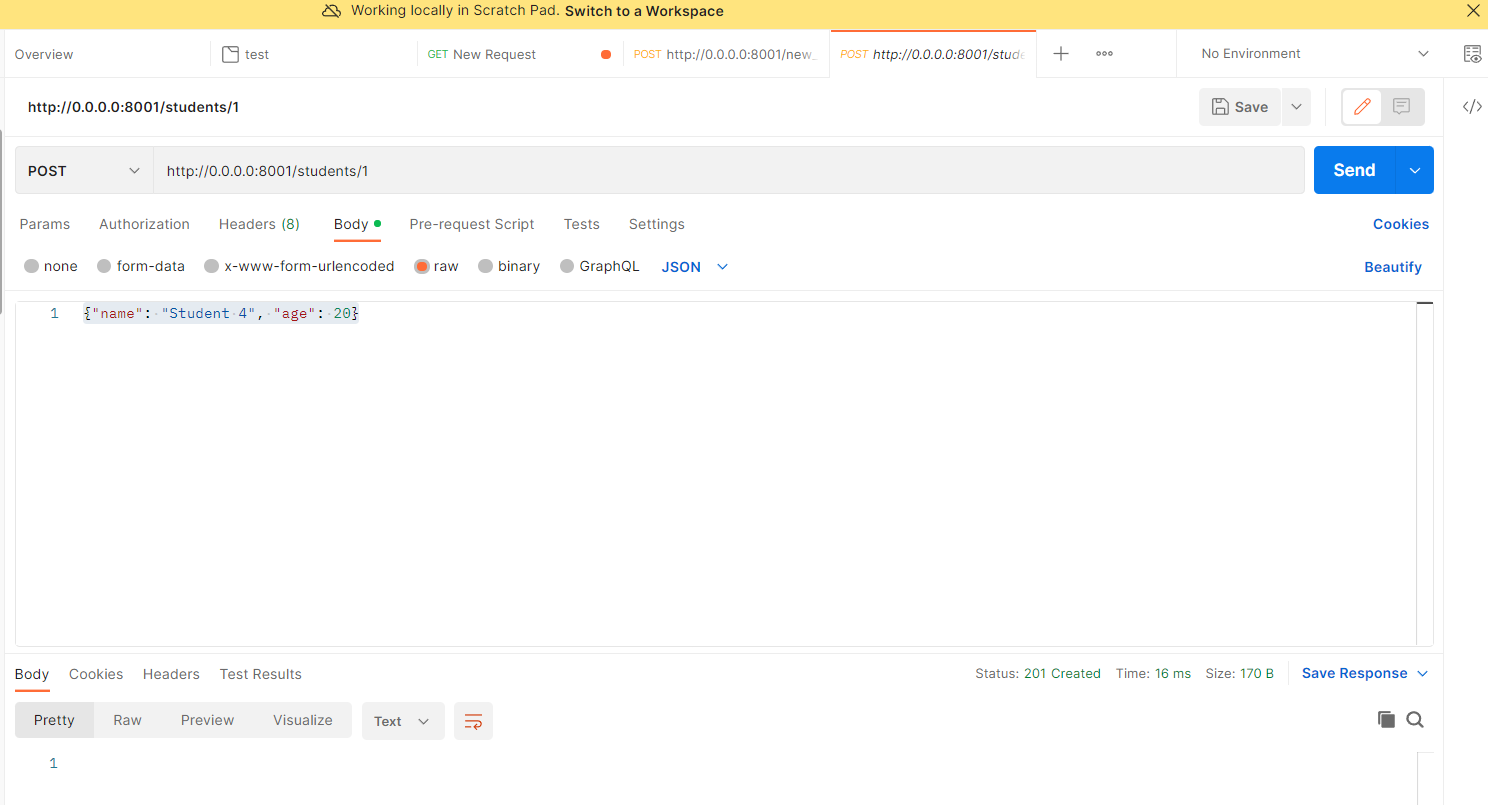
The post function is used to create a new student; it uses the StudentRecord class to validate the input data in the request body; it returns an error if the student_id already exists; if not it returns a success message with HTTP code 201, as the previous example the response is a JSON response.
@api_router.post('/students/{student_id}')
async def post_endpoint(student_id:int,student: StudentRecord) -> dict:
    """ POST Request """
    response                = {}
    response['body']        = {}
    response['status_code'] = 0
    if student_id in students.keys():
        response['body']        = {'error':"student_id %s exists"%(student_id)}
        response['status_code'] = 409
    else:
        student = dict(student)
        students[student_id] = {'name': student['name'], 'age':student['age']}
        response['status_code'] = 201
        response['body']        = {'info':"student_id %s record created."%(student_id)}
    return Response(content     = str(response['body']),
                    media_type  = "application/json",
                    status_code = response['status_code'])
Explaining the PUT request
The put function accepts a student_id in the URL plus the StudentRecord class; if the student_id does not exist in the dictionary, the API returns a 404 response plus a message that student_id does not exist, else it modifies the content of the record and returns an HTTP 200 response.
@api_router.put('/students/{student_id}')
async def put_endpoint(student_id:int,student: StudentRecord) -> dict:
    """ PUT Request """
    response                = {}
    response['body']        = {}
    response['status_code'] = 0
    if student_id in students.keys():
        student = dict(student)
        students[student_id] = {'name': student['name'], 'age':student['age']}
        response['status_code'] = 200
        response['body']        = {'info':"student_id %s record modified."%(student_id)}
    else:
        response['body']        = {'error':"student_id %s does not exist"%(student_id)}
        response['status_code'] = 404
    return Response(content     = str(response['body']),
                    media_type  = "application/json",
                    status_code = response['status_code'])
Explaining the DELETE request
The delete request accepts a student_id in the URL; if the id exists, it deletes the record, else it returns an HTTP response of 404 and a message that the student_id does not exist
@api_router.delete('/students/{student_id}')
async def del_endpoint(student_id:int) -> dict:
    """ DEL Request """
    response                = {}
    response['body']        = {}
    response['status_code'] = 0
    if student_id in students.keys():
        del(students[student_id])
        response['status_code'] = 200
        response['body']        = {'info':"student_id %s record deleted."%(student_id)}
    else:
        response['body']        = {'error':"student_id %s does not exist"%(student_id)}
        response['status_code'] = 404
    return Response(content     = str(response['body']),
                    media_type  = "application/json",
                    status_code = response['status_code'])
The rest of the code
The rest of the code defines what functions to be included to the router api and to start the uvicorn web server listening to 0.0.0.0 and port 8001 with a debug level (don’t use debug in production)
app.include_router(api_router)

if __name__ == '__main__':
    uvicorn.run(app, host = "0.0.0.0", port = 8001, log_level = "debug")
How to test the API
There are many ways, you can use tools like curl, but a better approach is to use postman, a tool with a nice UI
Get example
Post Example
I hope you found this article useful :)
$ ls ./see-also/
$ ./buy-me-a-coffee ☕ // found this useful? I write these in my spare time