How send data using ping (or how ping can turn evil!)

We all know ping, its very useful tool that allows us to verify connectivity between hosts and troubleshoot issues like network latency and packet loss, but it has also another more “dark” side, each ICMP packet has a data section that can be easily customized with whatever data you want.. its quite small and the ICMP protocol in nature does not support any TCP mechanisms like error recovery and packet order rebuild but still is a feature that can be exploited, lets see how!
The ICMP protocol
To make things easier lets talk a bit about the ICMP packet. An ICMP packet consists of a two byte header and the data section, the ICMP packet type we need to manipulate is the the type 8 or more commonly known as “Echo Request Message” and this is kind of ICMP packets send tools as ping to verify network connectivity or troubleshoot issues like network latency and packet loss
How to send data with ping
To send data with ping we need first to convert them to hex, to do this we use the xdd -p command
❯ payload=$(echo -n "Hello" | xxd -p)
❯ echo $payload
48656c6c6f
Then we need to calculate the length of the data and add 2, since the total packet we will send will be the headers plus the data part
❯ len=$(($(echo $payload | wc -c | tr -s " ") + 2))
❯ echo $len
13
And now we are ready to send data with ping!
- -s parameter defines the total size which takes the value of $len variable
- -p parameter defines the data we want to send, which takes the value of $payload
- -c parameter defines how many times we will send this ICMP packet
- 127.0.0.1 is my loopback address,its an ip address available only to the computer
ping -s$len -c4 -p$payload 127.0.0.1
PATTERN: 0x48656c6c6f
PING 127.0.0.1 (127.0.0.1): 13 data bytes
21 bytes from 127.0.0.1: icmp_seq=0 ttl=64
21 bytes from 127.0.0.1: icmp_seq=1 ttl=64
21 bytes from 127.0.0.1: icmp_seq=2 ttl=64
21 bytes from 127.0.0.1: icmp_seq=3 ttl=64
How to read ping data
And we can see that works! but how we can verify that actually the dara are transmitted within the ICMP packets?
- tshark is the command line version of wireshark is used to read network data from packet capture files or network interfaces in real time
- -i says tshark to read data from the loopback interface “lo0”
- -Y filter only ICMP packets
- -T fields -e data print only the data part of the selected ICMP packets
- -l flush buffers to stdout very often, useful since we pass data to another tool xxd
- xxd -r converts hex data back to binary data
❯ tshark -l -i lo0 -Y "icmp" -T fields -e data | xxd -r
Capturing on 'Loopback: lo0'
Re-run ping
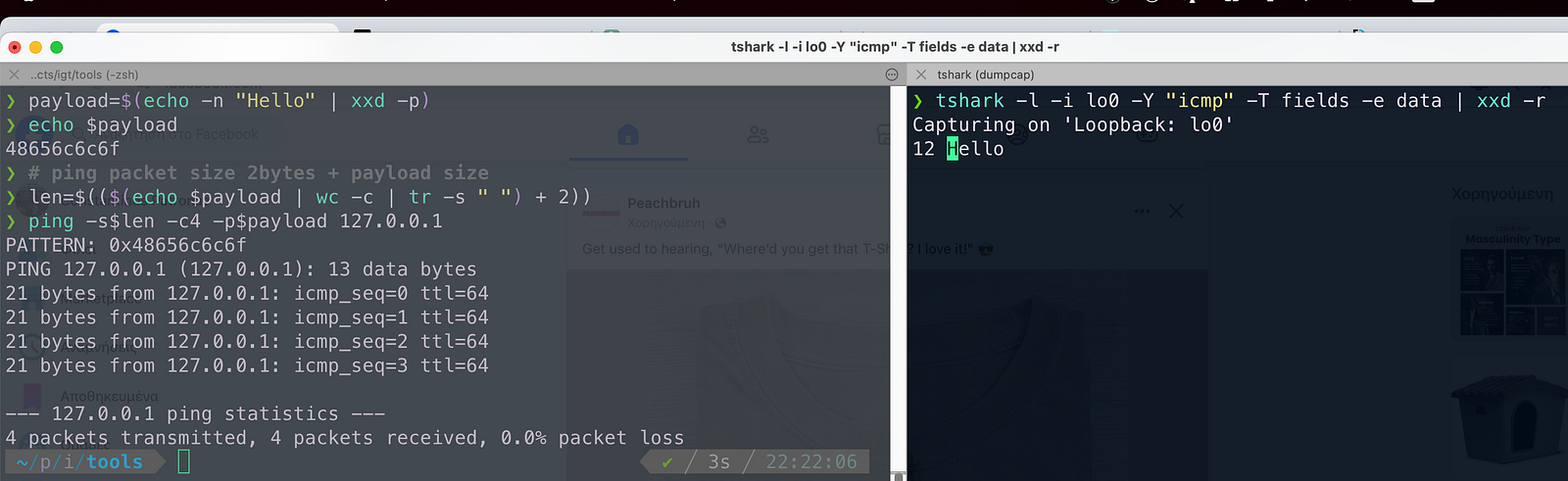
Now we have tshark listening for ICMP packets on the loopback interface lets try again to run ping, if everything gone as expected you should see the following, Text “Hello” under the tshark command!, might not seem impressive but if you think about ping can be a security hole!
Conclusion
As you saw ping can be a security hole since it can transmit data to any host in the internet, this is way some corporations have disabled ICMP packets in their firewall! i hope you enjoyed this article!
$ ls ./see-also/
$ ./buy-me-a-coffee ☕ // found this useful? I write these in my spare time